


Today we are introducing PageIndex Flash, a fast tree-indexing engine for long, text-based PDFs. PageIndex Flash runs entirely on your own machine — your documents never leave it — and it is available now in the PageIndex SDK.
PageIndex Flash builds a hierarchical tree index by reading a PDF's own layout, rather than asking a vision model to infer the whole outline from scratch. That one change makes indexing fast, cheap, and predictable enough to run across every text-based document you hold.
PageIndex Flash is fully open-sourced and is the default indexer in the SDK's local mode, which brings the complete reasoning-based RAG workflow to your machine. Build tree indexes, store documents, run reasoning-based retrieval, and chat with long documents using your preferred LLM and API key, with page-level citations and no vector database.
Install it with one command:
pip install -U pageindex
PageIndex Flash runs locally by design. It uses your own model API key, keeps every index on your own disk, and requires no vector database, which makes it suitable for private and regulated document workflows. The local pipeline reads the PDF directly and runs no OCR, so it expects text-based PDFs. For scanned files and image-heavy documents, we recommend PageIndex Cloud, which runs OCR and image understanding before the tree is built.
What is PageIndex?
Most RAG systems split a document into fixed-size chunks and retrieve them by vector similarity. This approach is useful, but similarity is not the same as relevance. In long professional documents, the passage that answers a question may use completely different language from the query. A semantically similar passage may also be nearby in meaning while being irrelevant to the actual task. Financial reports, regulations, technical manuals, and textbooks often require context, domain knowledge, and multi-step reasoning to identify the right evidence.
PageIndex takes a different approach. It organizes each document as a hierarchical tree index, then lets an LLM reason through that tree the way a human reader uses a table of contents and section structure to find the right pages. That splits retrieval into two stages — building the tree, then searching it:
<cite doc="report.pdf" page="43"/>Using PageIndex Flash in the SDK
We build PageIndex Flash to accelerate the tree indexing process for text-based PDFs. It is now the default indexing method in PageIndex SDK local mode:
import os
from pageindex import PageIndexClient

os.environ["OPENAI_API_KEY"] = "your-openai-key"

client = PageIndexClient(
    index="gpt-5.6-luna",
    chat="gpt-5.6-sol",
)

doc_id = client.submit_document("report.pdf")["doc_id"]

messages = "What benchmarks are used?"

for chunk in client.chat(messages, doc_id=doc_id, stream=True):
    print(chunk, end="", flush=True)
Index construction and document search have different requirements, so the SDK lets you configure them independently.
- The index model creates node summaries and helps optimize the tree. A basic, cost-efficient model is generally sufficient.
- The chat model searches the tree, evaluates relevance, reads evidence, and produces the final answer. Use the strongest model that fits your accuracy and cost requirements.
This separation keeps the one-time indexing cost low without limiting the quality of later retrieval. It also lets you change the chat model without rebuilding the document index.
PageIndex Flash is built around that split. Because the PDF layout already supplies the structure, the index model never has to reconstruct an outline — it only summarizes sections that have already been located. An inexpensive model is therefore enough to produce a tree that holds up under retrieval, and paying for a larger one buys very little at this stage.
In our benchmark setup we did exactly that, using the cheap gpt-5.6-luna as the index model — the same one shown in the snippet above. Indexing costs approximately $0.001 per page with it. A 1,000-page textbook costs a little over one dollar to index once, after which the same tree can serve every question.
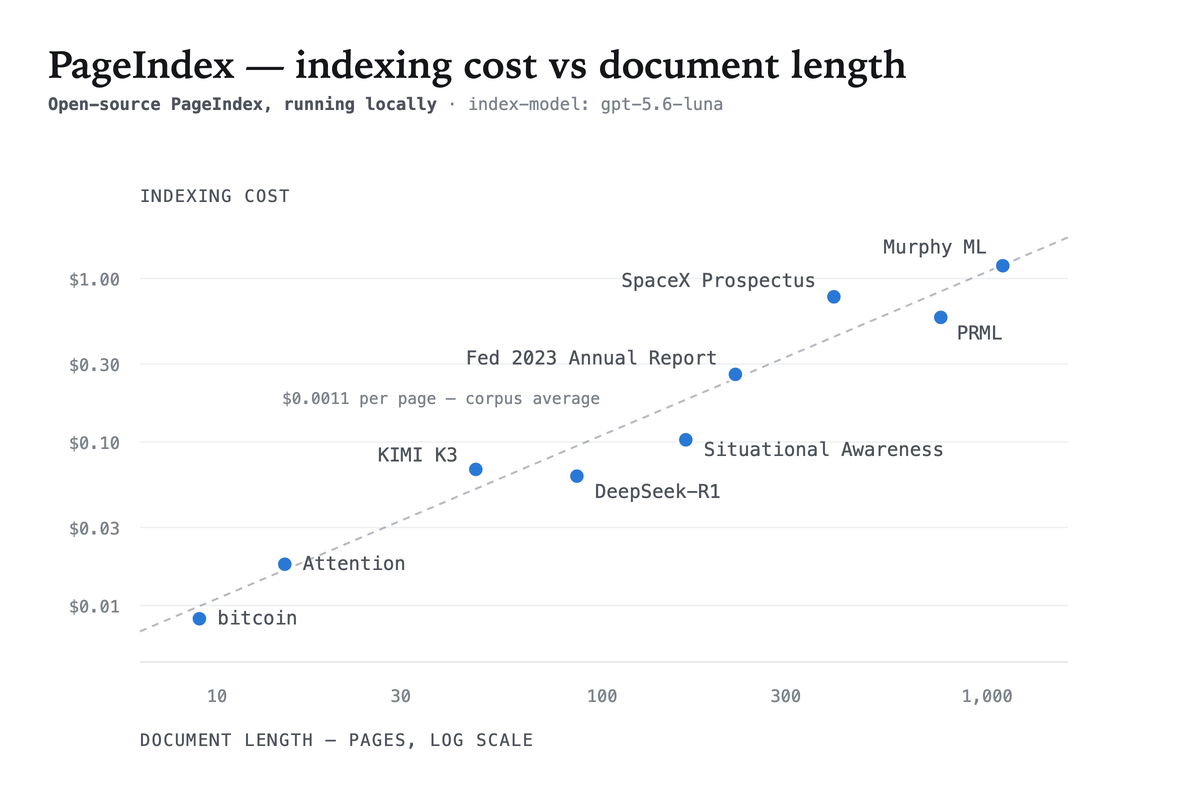
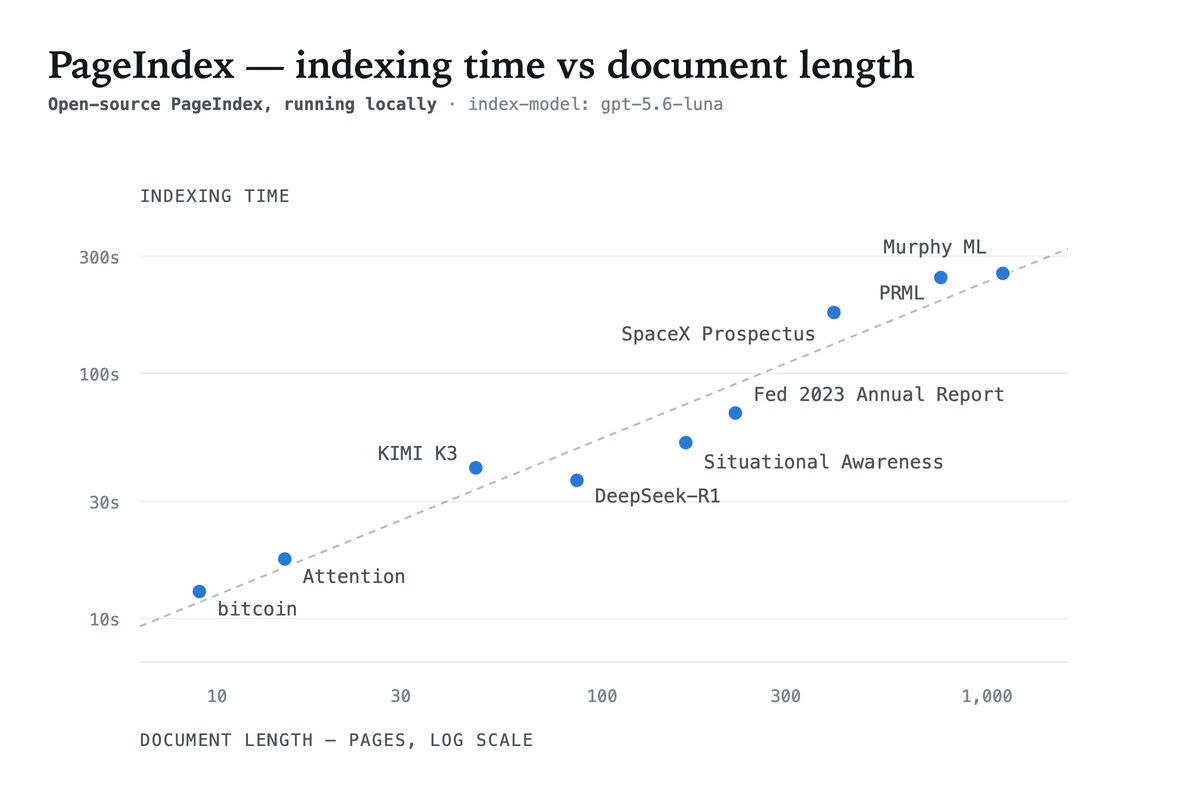
Across benchmark documents ranging from 9 to 1,098 pages, indexing completed in approximately 13 seconds to 4.5 minutes.
The tree contains titles, page ranges, summaries, and nested sections. It acts as a table of contents optimized for LLM search while remaining understandable to developers.
Query Cost and Accuracy
The PageIndex OSS Benchmark evaluates the same local setup shown above: PageIndexClient() with PageIndex Flash indexing.
The benchmark contains 62 lookup questions over 34 PDFs and 1,945 pages drawn from MMLongBench-Doc-V2. Every answer is a fact stated in running text, so an incorrect result represents a retrieval or reading failure rather than an open-ended reasoning disagreement.
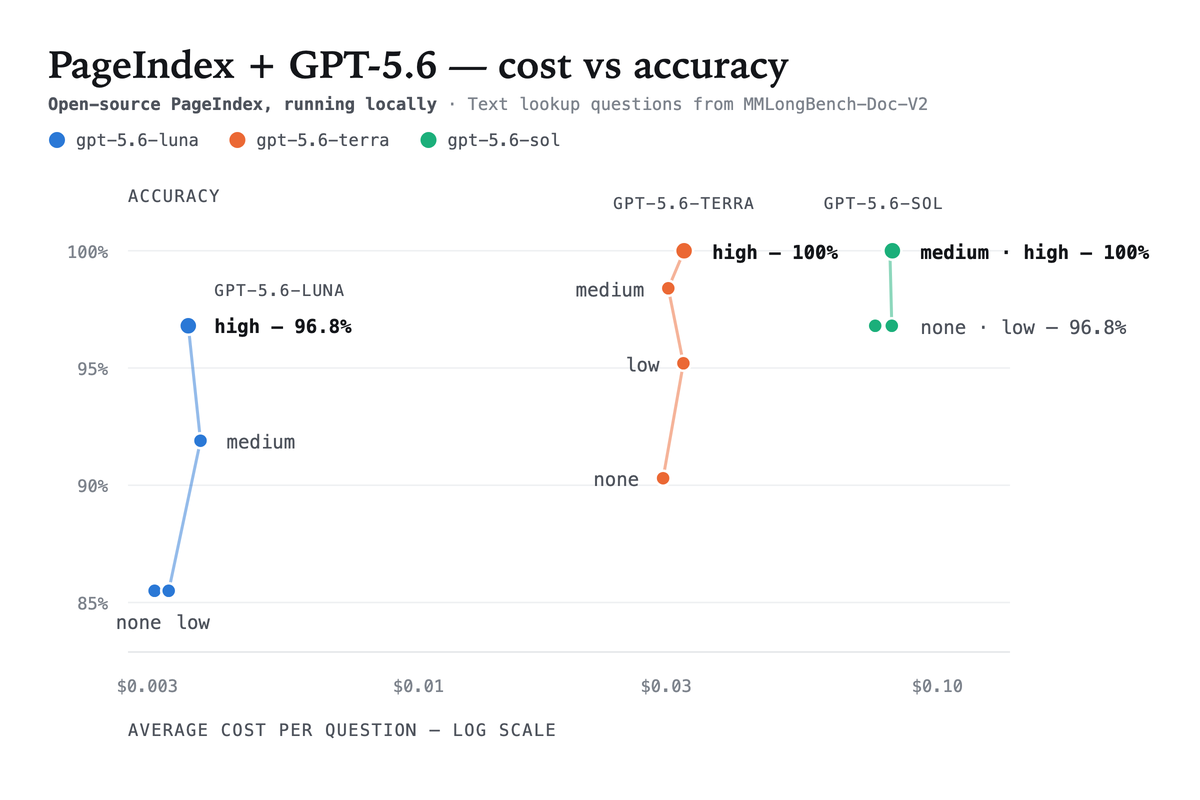
Within each model, increasing reasoning effort creates a clear accuracy ladder at a relatively similar cost level. Moving to a larger model can improve the frontier further, but often increases the cost per question by an order of magnitude. This gives teams a practical way to tune deployment: choose a model family for the target budget, then adjust reasoning effort for the required accuracy.
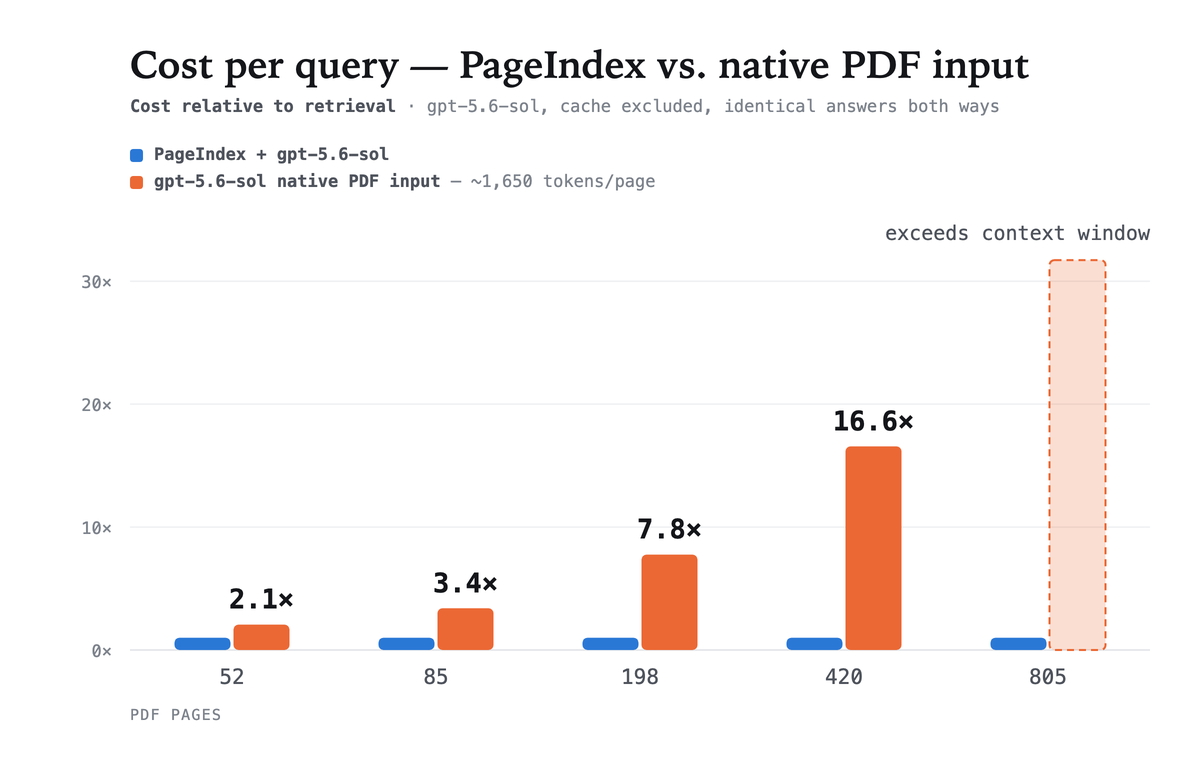
Retrieving over the tree is also far cheaper than passing the whole document to the model. Feeding the same PDF in natively costs 2.1× more on a 52-page file and 16.6× more at 420 pages, and past roughly 800 pages it no longer fits in the context window at all.

Full results, source documents, and the benchmark runner are available in the benchmark repository.
Scanned and Image-Heavy PDFs: Use PageIndex Cloud
Reading structure out of the PDF itself is what makes PageIndex Flash fast, and it is also what bounds it to text-based files. A scanned page carries no text layer and no heading metadata — it is an image of a document rather than a document — so there is nothing for PageIndex Flash to parse. Recovering the outline in that case requires a vision model to read the page and recognize its layout, which is what PageIndex Cloud runs before the tree is built. The same applies to files that carry their meaning in figures, tables, and diagrams rather than in running text.
For those documents we recommend PageIndex Cloud, and switching is a one-line change. Point index at cloud, add a PageIndex API key, and the rest of the workflow stays exactly as it was:
import os
from pageindex import PageIndexClient

os.environ["PAGEINDEX_API_KEY"] = "your-pageindex-key"
os.environ["OPENAI_API_KEY"] = "your-openai-key"

client = PageIndexClient(
    index="cloud",
    chat="gpt-5.6-sol",
)

doc_id = client.submit_document("report.pdf", wait=True)["doc_id"]

messages = "What benchmarks are used?"

for chunk in client.chat(messages, doc_id=doc_id, stream=True):
    print(chunk, end="", flush=True)
The two modes differ in more than where indexing runs:
| Capability | Local | Cloud |
|---|---|---|
| Best for | Text-based PDFs with a real text layer | Scanned, image-heavy, and large document collections |
| Indexing | Runs locally | Managed by PageIndex Cloud |
| Storage | Local | Managed cloud storage |
| Chat model | Your model | Your model |
| Citations | Page-level | Line-level |
| OCR and image understanding | — | Included |
| Multi-document scale | Manual | PageIndex File System |
| MCP server | — | Included |
Integrate PageIndex into Your Agent Workflow
PageIndex can be easily integrated into an agent you already have instead of taking over its control flow. Local and cloud mode expose the same interface, which means the integration below is unchanged whether the index was built by PageIndex Flash on your machine or by PageIndex Cloud.
With the OpenAI Agents SDK, the client hands over the tool definitions, the system guidance that goes with them, and the document context that opens the conversation, reusing the client and doc_id from above:
from agents import Agent, Runner

agent = Agent(
    name="PageIndex",
    instructions=client.agent_instructions(),
    tools=client.as_openai_tools(),
    model="gpt-5.6-sol",
)

messages = [
    {"role": "user", "content": client.document_context(doc_id)},
    {"role": "user", "content": "What benchmarks are used?"},
]

result = Runner.run_sync(agent, messages)
document_context(doc_id) supplies the selected document's context as a separate first user message. as_openai_tools() returns the tree-search tools in the provider's own tool format, and agent_instructions() supplies the prompt that tells the model how to walk the tree — so the agent reasons over document structure without you writing any retrieval logic.
The same client also targets the Anthropic SDK tool runner, the Claude Agent SDK, LangChain, and PydanticAI, and exposes the tools as plain Python functions for anything not on that list. See the agent integration docs for each variant.
Fully Open Source
PageIndex Flash ships entirely in the open, and so does the rest of local mode. PageIndex Flash indexing, reasoning-based tree search, document chat, and page-level citations all live in the PageIndex repository on GitHub, so you can read the retrieval logic line by line, run the whole pipeline offline, and adapt it to your own agent.
Full API details are in the documentation. To try reasoning-based retrieval without installing anything, open PageIndex Chat. To move indexing and storage to the managed path, get a PageIndex Cloud API key.